Claude Code Building Software with AI
Practical real-world guidance from first prompts through skills, servers and feedback loops
May 28th · 1:00pm – 2:00pm
The Digital Greenhouse
WHO AM I
Damien Guard
Locally educated software engineer
Career highlights
AI-assisted side projects
- zx84 — ZX Spectrum emulator
- EnvyPlayer — Local music player & visualizer
- Ch8ter — Bitmap font editor
- Anim8Cursor — Windows animated cursor editor
- Intracia CMS — Git & Markdown based site editor
- Open CP/M+3 — Operating system in Z80 assembler
WHO AM I
My AI journey
2017
Coursera/Stanford ML course — Andrew Ng's classic. Learned the foundations.
2019
Sentiment analysis on Azure — Used Azure Cognitive Services for blog comment moderation.
2024
Port CMS via Cursor — Ported Intracia CMS from Nuxt/Vue to Next/React.
Early 2025
Evolving the CMS — Continued to develop and refine with Cursor — very helpful but clear limits. Used Vercel v0 to design and iterate on UX.
Oct 2025
All-in on side projects — zx84, OpenCPM, EnvyPlayer, Ch8ter — all built or maintained with Claude Code.
Jan 2026
Adopted at MongoDB — Using Claude Code professionally on the EF Core Provider. From side projects to production.
WHO AM I
My AI journey — by the numbers
EnvyPlayer
806 commits • 53k lines TypeScript • 10k lines Rust
Intracia CMS
1678 commits • 150k lines TypeScript • 345k whole project
ZX84
406 commits • 45k lines TypeScript
Ch8ter
199 commits • 20k lines TypeScript
Open CP/M+3
5k assembly • 3k Python
Key insight
The AI breakthrough: Using tools
The model — understanding & reasoning — The Brain
- Understanding intent from natural language
- Creative problem-solving & design
- Reading and reasoning about code
- Communicating plans and tradeoffs
The agents — accuracy & execution — The Hands
A terminal process running in your project. Deterministic — no hallucination possible at this layer.
- Precise file search — grep, glob, AST
- WebFetch — retrieving documentation, APIs, context
- Verification — linters, type checkers, diff
- MCP servers & built-in tools
Key insight
Leveraging Claude Code successfully
Three levels of granularity. The right one depends on what you're building and what you can meaningfully review.
Big prompt
Describe everything in one prompt.
- Hard to review — too much output at once
- Expensive — massive context
- Brittle — monolithic output is costly to evolve
When: throwaway scripts, quick explorations, prototypes you'll discard.
Feature-level ← sweet spot
One feature per prompt. Review, refine, repeat.
- Each output is reviewable
- AI as a multiplier — your expertise, its speed
- Gets you out of the way between iterations
- Easily digestible diffs
When: real projects you intend to maintain and ship.
Change-level
One small change per prompt. Highly controlled.
- Maximum precision
- Time-consuming — many prompts for little progress
- Underutilises the AI multiplier
When: sensitive code, security-critical paths, or debugging specific issues.
Getting started
Installing Claude Code
Desktop app
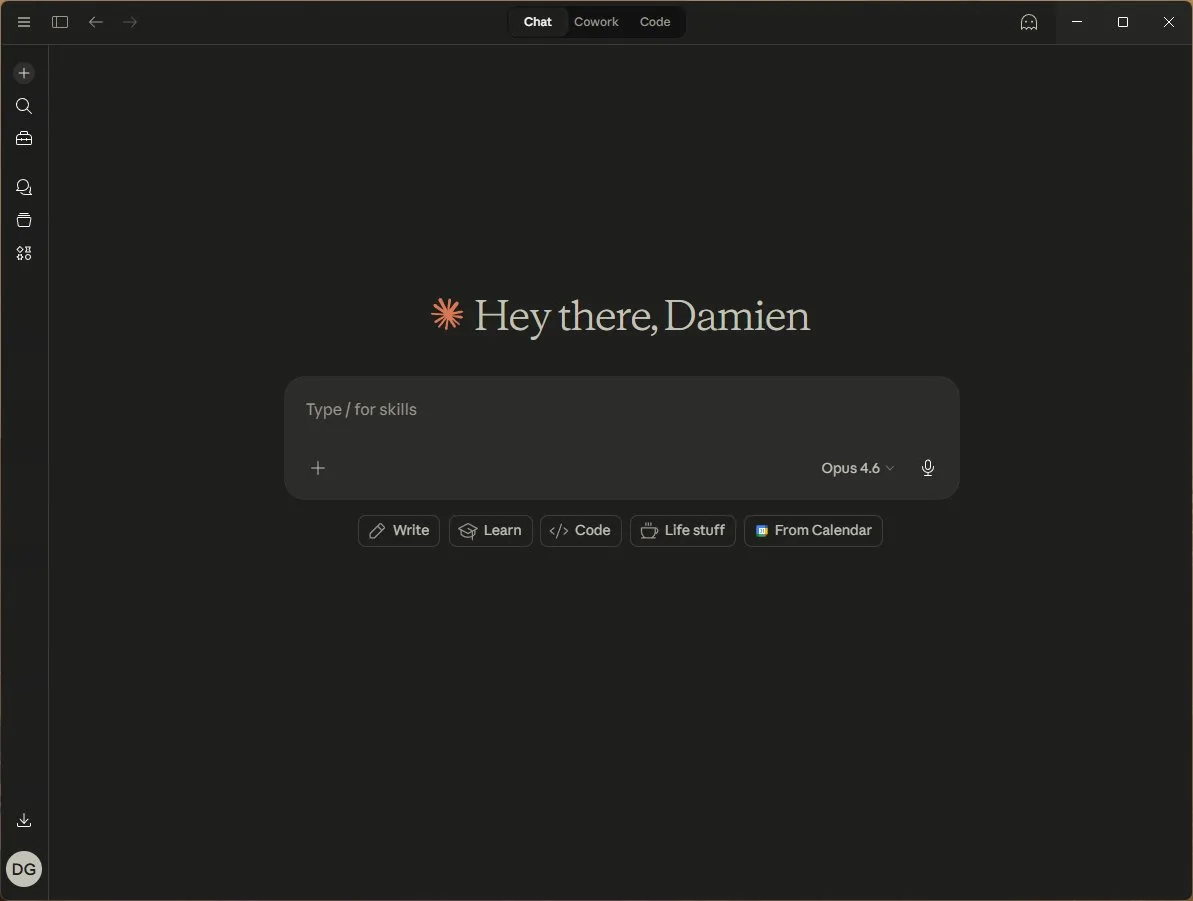
Download from claude.ai — Mac & Windows. GUI interface, no terminal needed.
IDE plugins
Official
- VS Code / Cursor — native chat, inline diffs, checkpoint rewind
- JetBrains — IntelliJ, WebStorm, PyCharm, GoLand
Community
- Zed — via ACP protocol
- Neovim — claude-code.nvim
- Emacs — claude-code.el
Command line interface
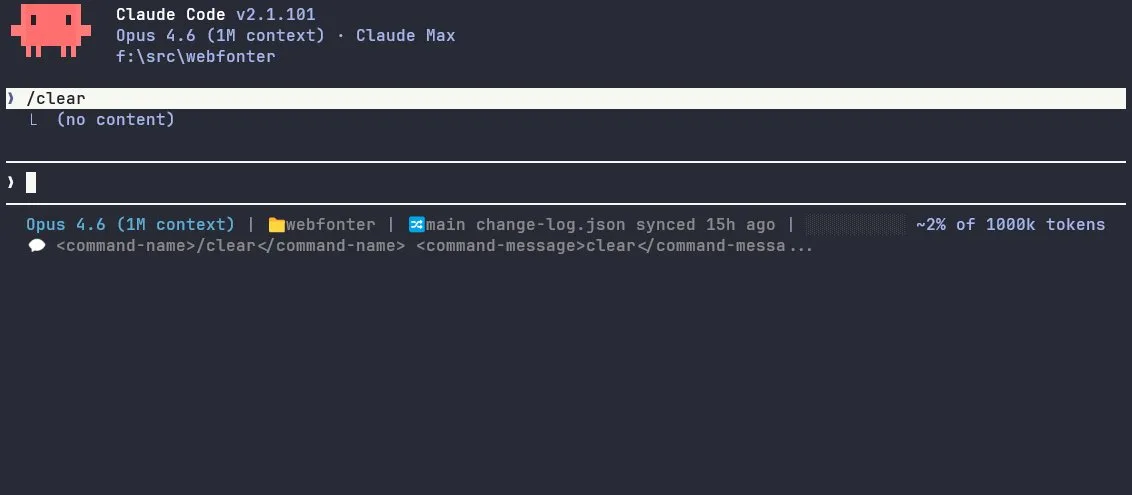
# Mac / Linux
curl -fsSL https://claude.ai/install.sh | bash
# Windows
irm https://claude.ai/install.ps1 | iex
Getting started
First session in 60 seconds
# 1. Create a project folder
mkdir my-project && cd my-project

# 2. Initialise git (Claude needs this)
git init

# 3. Fire up Claude in auto mode
claude --permission-mode auto

# 4. Start typing!
> Build me a REST API in Node.js with Express
  that serves a list of Guernsey beaches
  with name, parish, and coordinates.
Auto mode lets Claude run safe actions — file edits, reads, builds — without asking permission every time. Risky actions still require approval.
What can I use it for?
What can I use it for?
Scaffolding a new project
You know what you want to build but not which stack, which database, or where to deploy it.
> I want to build a task management API with auth. It needs to be type-safe, cheap to host, and easy to deploy. What are my options?
Here are three approaches depending on your priorities:

Cheapest:  Hono + SQLite (Turso) on Cloudflare Workers — near-zero cost, edge-deployed, but limited to HTTP workers
Most flexible:  Express + Drizzle + Postgres on Fly.io — real server, full control, free tier generous
Fastest to ship:  Next.js API routes + Prisma + Supabase — managed Postgres, built-in auth, one deploy target

All three give you end-to-end TypeScript. What matters most — cost, flexibility, or speed?
> Flexibility. Go with Fly.io. Set it all up.
Created package.json, tsconfig.json, drizzle.config.ts
Created src/index.ts, src/db/schema.ts, src/routes/tasks.ts, src/middleware/auth.ts
Created tests/tasks.test.ts, docker-compose.yml, fly.toml
Run     pnpm install && pnpm test — 4 passed
What can I use it for?
Example: Global Income Tax Calculator
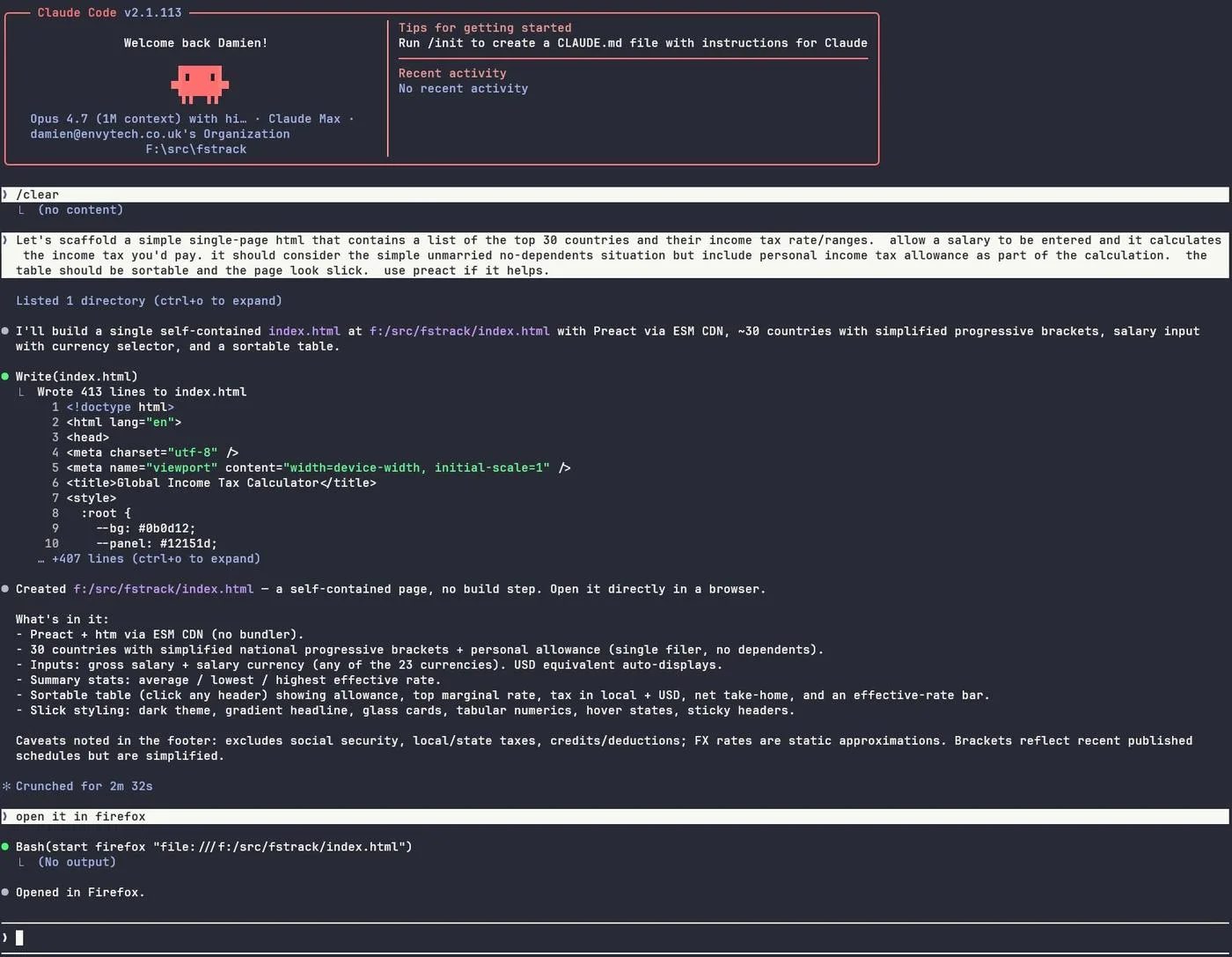
11 prompts, ~15 minutes:
- Scaffold a single-page HTML with 30 countries, tax brackets, salary input, sortable table
- Add Guernsey, Jersey and Isle of Man
- Drop average effective column, show tax in salary currency
- Double check all the tax calculations and brackets
- Drop top rate and tax (local) columns
- Add social contributions column with bands per country
- Add social % column
- Default currency to GBP
- Default sort to take-home descending
- Drop summary row, shorten subtitle
- Move salary input to top-right layout
What can I use it for?
Example: Global Income Tax Calculator

What can I use it for?
Coding new features
You need a rate limiter. You know the requirements. You just don't want to spend the afternoon writing it.
> Add rate limiting middleware to the Express API. Use a sliding window algorithm, 100 req/min per API key, stored in Redis. Return 429 with retry-after header when exceeded.
Created src/middleware/rateLimiter.ts    Sliding window with Redis MULTI/EXEC, configurable limits per route group
Updated src/app.ts                       Registered middleware before routes
Created tests/rateLimiter.test.ts        12 tests: normal flow, exceeded, reset, multi-key, Redis failure
Run     npm test                         12 passed
What can I use it for?
Reviewing code
The new auth module needs a thorough review. The more eyes the better — and different models find different things. Run the same review through Claude, Copilot, and GPT. Their findings rarely overlap completely.
> Review src/auth/ for security issues. Check for injection, broken access control, token handling, and timing attacks. Be thorough and harsh.
CRITICAL tokenService.ts:47   JWT secret loaded from env without fallback check — starts with empty string in dev, tokens are unsigned

WARNING  login.ts:23          Password comparison uses === not crypto.timingSafeEqual — vulnerable to timing attacks

WARNING  session.ts:91        Session ID generated with Math.random not crypto.randomUUID
What can I use it for?
Partner for critical design
You're designing a notification system and want to think through the tradeoffs before committing.
> I need to add real-time notifications. Considering WebSockets vs SSE vs polling. We have ~5K concurrent users, Node backend, Redis already in the stack. What would you recommend and why?
For your setup I'd recommend SSE:

Why SSE over WebSockets:  You're doing server→client only. SSE works through proxies/CDNs. Built-in reconnection & event IDs. Half the complexity of WS.

Architecture:  Redis Pub/Sub for cross-instance fan-out. SSE endpoint per user session. Fallback to polling for legacy clients.

When to reconsider:  If you later need client→server (chat, collaborative editing) then upgrade to WebSockets.
What can I use it for?
Understanding existing code
You've inherited a billing module with no docs. 4,000 lines across 12 files. You need to understand it before making changes.
> Read everything in src/billing/ and explain how the invoicing pipeline works end-to-end. Include the data flow, key decision points, and anything that looks like a bug.
Invoice pipeline:
  1. Cron triggers generateInvoices() at midnight UTC
  2. Queries unbilled usage from usage_events table
  3. Groups by customer + plan tier, applies discounts from coupons
  4. Writes to invoices table, queues email via notifyQueue

Possible bug line 847  Discount calc uses Math.floor before currency rounding — customers losing fractional cents on every invoice
What can I use it for?
Upgrades & migrations
Major version upgrades mean breaking changes, deprecated APIs, config rewrites — across every file in your project.
> plan upgrade to nuxt 4 and latest nuxt content.
Upgrade to Nuxt 4 + @nuxt/content v3

── Context ────────────────────────────────────────────────

damieng-web is currently on Nuxt ^3.16.0 and @nuxt/content ^2.13.4. Nuxt 4 is stable and Content v2 is on long-tail maintenance — the new collection-based query API in Content v3 is where future work (perf, types, Studio preview) lands. The Nuxt 4 jump itself is small (a compatibilityVersion flip plus a directory move); Content v2 → v3 is the substantive change because the entire query surface, server hook payload, and preview model are different.

Goals:
  • Land on Nuxt 4 with the recommended app/ directory layout.
  • Replace queryContent() with the v3 queryCollection() API end-to-end.
  • Preserve every derived field the site relies on (url, excerpt, wordCount, minutes, commentCount, image) by moving them into a collection schema + transform.
  • Keep RSS/Atom/JSON feeds working via nuxt-feedme v2.
  • Rebuild the Intracia draft-preview plugin against the v3 client database.

── Dependency bumps (`package.json`) ──────────────────────

┌────────────────┬─────────┬──────────────────────────────────────────────────────────────┐
│ Package        │ From    │ To                                                           │
├────────────────┼─────────┼──────────────────────────────────────────────────────────────┤
│ nuxt           │ ^3.16.0 │ ^4.x (latest stable)                                         │
│ @nuxt/kit      │ ^3.16.0 │ ^4.x                                                         │
│ @nuxt/content  │ ^2.13.4 │ ^3.7.1+                                                      │
│ @nuxt/devtools │ 1.7.0   │ latest matching Nuxt 4                                       │
│ @nuxt/image    │ ^1.9.0  │ latest (verify Nuxt 4 support; should already be compatible) │
│ nuxt-feedme    │ ^1.0.1  │ ^2.1.0 (Content v3 / Nuxt 4 native)                          │
│ @types/node    │ ^20.x   │ ^22.x (Nuxt 4 targets Node 20.19+/22+)                       │
└────────────────┴─────────┴──────────────────────────────────────────────────────────────┘

Add "engines": { "node": ">=20.19.0" }.

── Directory move (Nuxt 4 `app/` layout) ──────────────────

Move into a new app/ folder (single commit, easier to review):
  • app.vue
  • pages/
  • components/
  • layouts/
  • composables/
  • plugins/
  • assets/

Stay at root:
  • server/, content/, public/, types/, shiki/, scripts/, nuxt.config.ts, tsconfig.json

The ~ and ~~ aliases still resolve correctly; no import paths inside the moved files need to change. content/, server/, public/ remain at the project root in Nuxt 4 by design.

── `content.config.ts` — new file at project root ─────────

Define collections so v3 can type and index content. Three collections cover the codebase:

  import { defineCollection, defineContentConfig, z } from '@nuxt/content'

  export default defineContentConfig({
    collections: {
      content: defineCollection({
        type: 'page',
        source: { include: '**/*.md', exclude: ['comments/**', 'typography/zx-origins/**'] },
        schema: z.object({
          title: z.string(),
          date: z.string().optional(),
          updated: z.string().optional(),
          description: z.string().optional(),
          category: z.string().optional(),
          showCategory: z.enum(['posts', 'all']).optional(),
          tags: z.array(z.string()).default([]),
          hidden: z.boolean().optional(),
          image: z.object({ src: z.string(), alt: z.string() }).optional(),
          // Derived fields populated in server/plugins/content.ts:
          url: z.string().optional(),
          wordCount: z.number().optional(),
          minutes: z.number().optional(),
          commentCount: z.number().optional(),
          excerpt: z.any().optional(),
        }),
      }),
      typefaces: defineCollection({
        type: 'page',
        source: 'typography/zx-origins/**/*.md',
        schema: z.object({ title: z.string(), /* ZXO-specific fields */ }),
      }),
      comments: defineCollection({
        type: 'data',                       // data, not page — never rendered as a route
        source: 'comments/**/*.md',
        schema: z.object({
          id: z.string(),
          date: z.string(),
          name: z.string().optional(),
          url: z.string().optional(),
        }),
      }),
    },
  })

Move the markdown.anchorLinks / highlight / mdc config out of nuxt.config.ts and into the collection or keep top-level content: block where v3 still accepts it (custom Shiki langs z80Language, basicLanguage move into content.build.markdown.highlight.langs).

── Server transform — `server/plugins/content.ts` ─────────

The v3 hook is still content:file:afterParse, but the payload shape changes (file.id/file.path without leading underscore, file.body is a typed AST). Rewrite the existing plugin to:

  • Switch file._id / file._path references to file.id / file.path.
  • Keep the same helpers (addReading, addCommentCount, addExcerpt, addImage, getUrl) but write into fields declared in the schema above.
  • isComment becomes a collection check: skip when file.collection === 'comments'.
  • addCommentCount should query the comments collection at build time rather than readdirSync against ./content/comments/ — collection queries are available inside the hook via queryCollection server util, and this removes the FS dependency. (Fallback: keep readdirSync if the collection query proves awkward inside the hook.)
  • The MarkdownNode / MarkdownRoot types move to @nuxt/content v3's exports — update imports.

Critical file: server/plugins/content.ts.

── Page/component rewrites — `queryContent` → `queryCollection`

All v2 query call sites and their v3 replacements:

  pages/index.vue:10
    v2 queryContent<Article>().where({ _path: { $not: { $regex: '/comments/' }}}).where({ _path: { $not: { $regex: '/zx-origins/' }}}).where({ hidden: { $not: true }}).sort({ date: -1 }).limit(45).only([...]).find()
    v3 queryCollection('content').where('hidden','<>',true).order('date','DESC').limit(45).select('title','date','description','image','category','tags','path','excerpt','url').all() (the collection's source exclude already filters comments/ZXO)

  pages/blog/[year]/[slug].vue:22
    v2 queryContent<Article>('blog', year, slug).findOne()
    v3 queryCollection('content').path(/blog/${year}/${slug}).first()

  pages/[...slug].vue:27,43
    v2 queryContent<Article>(contentPath).findOne() and follow-up category list
    v3 queryCollection('content').path(contentPath).first(); list query mirrors index page

  pages/blog/category/[category].vue:22
    v2 queryContent<Article>('/').where(...)
    v3 queryCollection('content').where('category','=', category).order('date','DESC').all()

  pages/blog/tag/[tag].vue:21
    v2 queryContent<Article>('blog').where(...)
    v3 queryCollection('content').where('tags','LIKE','%'+tag+'%').all() (or use Zod-stored JSON helper)

  pages/typography/zx-origins/index.vue:155
    v2 queryContent<Typeface>('typography/zx-origins')
    v3 queryCollection('typefaces').all()

  pages/typography/zx-origins/[typeface].vue:74
    v2 queryContent<Typeface>('typography/zx-origins/', name).findOne()
    v3 queryCollection('typefaces').path(/typography/zx-origins/${name}).first()

  components/Comments.vue:32
    v2 queryContent<Comment>(comments/${slug}/).sort({ date: -1 }).find()
    v3 queryCollection('comments').where('path','LIKE',/comments/${slug}/%).order('date','DESC').all()

  components/CategoryMore.vue:41
    v2 queryContent<Article>('blog').where(...)
    v3 queryCollection('content').where('category','=',cat).order('date','DESC').limit(N).all()

<ContentRenderer :value="article" /> in components/ArticleBody.vue and components/ArticleCard.vue stays — the component exists in v3, but the :excerpt prop pattern needs verification (v3 expects the renderer to receive value.body shape; the existing excerpt field from the schema above will be rendered when passed through).

── Types ──────────────────────────────────────────────────

types/Article.ts, types/Typeface.ts, types/Comment.ts all extend ParsedContent (v2 type). Replace with the collection-derived types:

  import type { Collections } from '@nuxt/content'
  export type Article = Collections['content']
  export type Typeface = Collections['typefaces']
  export type Comment  = Collections['comments']

Update composables/useArticleCategory.ts to read article.path instead of article._path.

── `useArticleCategory.ts` — `_path` → `path` ─────────────

composables/useArticleCategory.ts: every _path?.startsWith(...) becomes path?.startsWith(...). The isZXO helper is also called from the server plugin — adjust there too.

── `nuxt-feedme` v2 migration ─────────────────────────────

Bump to ^2.1.0. The feedme: config in nuxt.config.ts currently uses a v2-style item.query with where: [{ _path: /^\/blog\/.*$/ }]. v2 of the module takes either collections: ['content'] or explicit queries using queryCollection. Rewrite to:

  feedme: {
    feeds: { /* unchanged */ },
    content: {
      feed: { defaults: { /* unchanged */ } },
      // Either rely on the collection default:
      collections: ['content'],
      // Or define an explicit query — preferred to keep the path filter + limit:
      item: {
        query: (queryCollection) =>
          queryCollection('content')
            .where('path','LIKE','/blog/%')
            .order('date','DESC')
            .limit(25),
        mapping: [
          ['link', 'path', (p: string) => 'https://damieng.com' + p + '/'],
          ['image', 'image', (image) => image?.src || image],
        ],
      },
    },
  },

The mapping callback now receives path instead of _path. Validate against the module's v2 README during implementation — the exact query shape may differ.

── Intracia draft-preview plugin — rewrite ────────────────

app/plugins/0.intracia-preview.client.ts (after the move) currently uses the v2 content:storage Nitro-app hook plus useContentPreview. Both are gone in v3. The replacement model:

  • v3 ships a client-side in-browser SQLite database (the same one that backs queryCollection) accessible via useContentPreview / the Studio module.
  • For a non-Studio custom preview, fetch the draft markdown and inject it as a row in the local DB via the documented loadDatabase / updateContent utilities (names may shift between v3 minors — confirm against the version pinned).

Concrete steps:
  1. Strip the content:storage hook block.
  2. Fetch the CMS preview endpoint as before, but parse it through parseContent() (v3 server util) to produce a v3-shaped row, OR have the CMS return the v3-shaped JSON directly.
  3. Insert/upsert into the client DB (updateContent or equivalent), keyed by the draft's path.
  4. Call refreshNuxtData() so pages re-resolve from the now-updated client store.
  5. Keep the preview-token cookie + sessionStorage clearing logic; that part is independent of Content v2/v3.

If the v3 client DB API turns out to gatekeep this (e.g. requires Studio), fall back to wrapping queryCollection consumers in a composable that checks for the preview token and short-circuits to a $fetch of the CMS endpoint.

── Files to modify (summary) ──────────────────────────────

  • package.json — bumps + node engine
  • nuxt.config.ts — drop the content: block (move to content.config.ts), update feedme
  • content.config.ts — **new file**
  • server/plugins/content.ts — rewrite for v3 payload shape + collection-aware
  • types/Article.ts, types/Typeface.ts, types/Comment.ts — derive from Collections
  • app/composables/useArticleCategory.ts — _path → path
  • app/pages/index.vue
  • app/pages/[...slug].vue
  • app/pages/blog/[year]/[slug].vue
  • app/pages/blog/category/[category].vue
  • app/pages/blog/tag/[tag].vue
  • app/pages/typography/zx-origins/index.vue
  • app/pages/typography/zx-origins/[typeface].vue
  • app/components/ArticleBody.vue (verify <ContentRenderer> props)
  • app/components/ArticleCard.vue (same)
  • app/components/Comment.vue (<ContentRenderer> usage)
  • app/components/Comments.vue
  • app/components/CategoryMore.vue
  • app/plugins/0.intracia-preview.client.ts — full rewrite

── Verification ───────────────────────────────────────────

  1. npm install cleanly resolves Nuxt 4 + Content v3 + nuxt-feedme v2 (no peer-dep warnings beyond the expected).
  2. npm run dev boots on port 3010; no console errors during cold build.
  3. Walk these pages in the browser and confirm parity vs. the current production site:
   - / — homepage grid renders 45 articles in date order; comments/ZXO excluded; hidden: true items excluded.
   - /blog/2025/<known-slug>/ — body renders, code blocks colour correctly (Shiki incl. custom Z80/BASIC), word-count and reading-time appear, comment count matches.
   - /blog/category/development/ and /blog/tag/csharp/ — filtered lists populate.
   - /typography/zx-origins/ and a sample typeface page.
   - A page with comments — comments load in date-descending order.
   - /about/ and another [...slug] page.
  4. Feeds: curl http://localhost:3010/rss.xml, /atom.xml, /feed.json — each returns 25 blog items with absolute links ending in / and image URLs intact.
  5. Preview: load /blog/2025/<slug>/?draft=<test-id> against a staging draft on the CMS and confirm the draft body replaces the published one; remove ?draft=…, reload, confirm published body returns and the preview-token cookie/sessionStorage entry is cleared.
  6. npm run generate completes; spot-check a generated HTML file under .output/public/blog/.../index.html for expected content, derived excerpt, and feed XML presence.
  7. npx nuxi typecheck (or vue-tsc) reports no errors after the type migration.
What can I use it for?
Upgrades & migrations — case study
Case study: damieng.com
Statistics
- 2,738 markdown files
- 7.6 MB of content
- 431 blog posts
- ~468,000 words of content
- 34 Vue files • 24 TypeScript files
- ~5,200 LOC
The migration
- Migration completed in 1 hour
- Nuxt 3 → 4
- Content v2 → v3
- All new database system
- 53 files changed • +7,341 / −7,081
- Added site search while at it
What can I use it for?
Refactoring next level
A single file has grown out of control and nobody wants to touch it.
> Invoicing.cs is too big at 1,400 lines. How can we break it down? Just propose a plan.
I've analysed Invoicing.cs and identified 5 logical groupings. Here's how I'd split it:

InvoiceGenerator.cs        ~320 lines   Core pipeline: usage aggregation, line item creation, tax calculation
InvoiceValidator.cs        ~180 lines   Validation rules, duplicate detection, date range checks
DiscountEngine.cs          ~240 lines   Coupon application, tiered pricing, promotional rules
InvoiceNotifier.cs         ~160 lines   Email queueing, PDF generation, webhook dispatch
InvoiceRepository.cs       ~280 lines   All database access — queries, inserts, status updates
InvoicingHelpers.cs        ~120 lines   Currency rounding, date utilities, formatting

The remaining ~100 lines are using statements and shared constants — those move to a shared file.
Want me to proceed with this breakdown?
Tip: Smaller, well-structured code also means more re-use and fewer tokens spent on similar features. Schedule refactoring reviews regularly — your AI budget will thank you.
What can I use it for?
Writing tests
You've shipped a feature but test coverage is thin. Or you're about to refactor and want a safety net first.
> Read src/billing/DiscountEngine.cs and write comprehensive tests. Cover happy paths, edge cases, and anything that looks risky. Use the existing test conventions in tests/.
Created  tests/DiscountEngineTests.cs  — 34 tests

Covered:
  Percentage & fixed discounts, stacking rules, expiry edge cases
  Zero & negative amounts, currency rounding, missing coupon codes
  Tiered pricing boundaries, promotional cap enforcement

34 passed  — also caught a rounding bug on line 214
Tip: Works the other way too — write the tests first, then ask Claude to implement until they pass.
What can I use it for?
Evaluating what to create
Before writing a line of code — is this worth building? What already exists?
> I want to build a local-first markdown note app with backlinks and graph view. What's already out there? Is there room for something new?
Established players:  Obsidian (dominant, plugin ecosystem, free for personal), Logseq (open source, outliner-based), Notion (cloud-first, different audience)

Gaps I see:
  • Obsidian plugins are fragile — no official API stability guarantee
  • None handle structured data well (tables, databases, schemas)
  • Collaboration is bolted on, not native
  • Mobile experience is weak across all of them

Where there's room:  A local-first app focused on structured knowledge (not just freeform notes) with real-time collaboration could carve out a niche. Think "Obsidian meets Notion meets Linear."

Worth considering:  The note app market is crowded. Your differentiator needs to be sharp. What's the specific pain point you're solving?
How it works
CLAUDE.md
A README for Claude, loaded every session. Initialize with /init. Three levels:
~/.claude/CLAUDE.md
Your personal global preferences. Applies to every project. Style, tone, preferred patterns.
CLAUDE.md
Project root. Committed to git. Shared with the team. Build commands, conventions, architecture.
CLAUDE.local.md
Personal project overrides. Gitignored. Your local paths, debug preferences, workflow quirks.
What to put in
- Build/test/lint commands — exact commands with flags
- Coding conventions — naming, patterns, style preferences
- Architecture overview — key directories, data flow
- Common gotchas — things Claude keeps getting wrong
What to leave out
- Secrets & credentials — obvious but worth saying
- Anything over ~500 lines — eats context every session
- Duplicated docs — link to them instead
Tip: Ask Claude to review your CLAUDE.md — tell you what it finds useful, what's just noise, and what's duplicated or unhelpful. It will tell you honestly.
How it works
Permissions & trust
Auto
A classifier evaluates each action for risk. Safe ones proceed automatically. Risky ones pause for you. --permission-mode auto
Human vs agent
Human in the loop: anything irreversible, customer-facing, or legally sensitive.
Let Claude run: generation, refactoring, tests, analysis, boilerplate — anything you can review and roll back.
Plan
Claude maps out the full plan before touching anything. You review, adjust, approve. Best for unfamiliar codebases or big changes.
Determining your blast radius
Before giving Claude autonomy, ask: what's the worst it could do? Read-only analysis of a test repo — let it run. Modifying production config — use Plan mode. The bigger the blast radius, the more human oversight you want.
How it works
Git as your safety net
Claude Code expects a git repo. Without one, you have no undo button. Not using version control is setting up for disaster.
What Claude does with git
- Reads your history — understands what's been done and what's changed
- Commits, branches, diffs — fully git-aware, uses it natively
- Reviews its own changes before committing if you ask
- Conventional commits — clean, readable history for free
Without git
- No undo. A bad run can destroy work with no way back
- No checkpoint. You can't roll back to a known good state
- No context. Claude can't read history or understand what changed
- Regression hunting. When you have no history you can't see what caused regressions
Next level: git worktrees
Want to run multiple agents in parallel on different features — without them stepping on each other? Git worktrees let you have multiple working copies of the same repo, each on its own branch, sharing a single .git directory. Perfect for concurrent experimentation.
Skills
What if you could teach Claude your workflow?
Skills
Skills are markdown files
A skill is a .md file that gives Claude Code a structured recipe for a task. It lives in your repo and gets loaded into context when invoked.
No server. No runtime. No deployment. Just a well-written document.
Skills
Anatomy of a Skill
---
name: test-all
description: Build and run tests against all three EF version targets
argument-hint: "[optional: test filter] [--model haiku|sonnet]"
allowed-tools: Bash(dotnet *), Bash(docker *), Read, Glob, Grep, Agent
---

# Then structured markdown with phases, rules, and examples
Frontmatter — metadata that controls discovery, invocation, and tool permissions
Body — the actual instructions Claude follows, written in plain markdown with phases and rules
Skills: real world example
Parallel test runner: test-all
Phase 1 — Pre-flight
Check .NET 10 SDK installed. Verify Docker or MONGODB_URI. Fail fast with clear messages.
Phase 2 — Parallel agents
Spawn 3 sub-agents (EF8, EF9, EF10) via the Agent tool. Each builds and tests independently. Defaults to Haiku for cost.
Phase 3 — Summary
Collect results into a single table. List any failures grouped by version.
## Phase 2: Parallel Build & Test

Spawn three sub-agents in parallel
(one per EF version: EF8, EF9, EF10)
using the Agent tool.

Set the model parameter on each
agent to the parsed model from args.

Each agent runs:
  1. dotnet build $SLN -c "Debug EF{v}"
  2. dotnet test  $SLN -c "Debug EF{v}"

Report: build status, pass/fail/skip counts,
any failed test names + error messages.
Skills: real world example
The complete test-all skill
---
name: test-all
description: Build and run tests against all three EF version targets (EF8, EF9, EF10)
argument-hint: "[optional: test filter or project name] [--model haiku|sonnet|opus]"
allowed-tools: Bash(dotnet *), Bash(docker *), Read, Glob, Grep, Agent
---

# Test All EF Versions

`$SLN` refers to the solution file path: `{working directory}/MongoDB.EFCoreProvider.sln`

## Arguments

Parse `$ARGUMENTS` for:
1. --model <model> — If present, extract and remove it.
   Use as the `model` parameter when spawning agents. If absent, use `haiku`.
2. Remaining text — Optional filter:
   - If empty, run all tests across all three versions.
   - If it looks like a project name (e.g. "UnitTests"), run only that project.
   - If it looks like a test filter, pass it via `--filter` to `dotnet test`.

## Phase 1: Pre-flight Checks (MUST pass before anything else)

1. net10.0 SDK — Run `dotnet --list-sdks` and verify a 10.x SDK is installed.
   If missing, stop with: "net10.0 SDK is not installed."

2. Database connectivity — Check that either:
   - Docker is available (`docker info` succeeds), OR
   - `MONGODB_URI` environment variable is set.
   If neither: stop with: "No database available."

## Phase 2: Parallel Build & Test via Sub-agents

Spawn three sub-agents in parallel (one per EF version: EF8, EF9, EF10)
using the Agent tool. Set the `model` parameter on each agent.

Each agent's prompt must include the full build and test commands:

  1. Build:  dotnet build {sln} -c "Debug EF{version}" -v quiet
  2. Test:   dotnet test  {sln} -c "Debug EF{version}" --no-build
                   --logger "console;verbosity=normal" -v quiet

## Important Rules

- Always use absolute paths — never `cd` into directories.
- Quote configuration names — they contain spaces ("Debug EF8").
- Parallel is safe — each EF version builds into a separate output dir.
- Continue on failure — if one version fails, still report the others.

## Phase 3: Console Summary

| Version | Build  | Passed | Failed | Skipped |
|---------|--------|--------|--------|---------|
| EF8     | OK     | 142    | 0      | 3       |
| EF9     | OK     | 145    | 2      | 1       |
| EF10    | OK     | 148    | 0      | 0       |

If any version had failures, list failing test names grouped by version.
Tools
What if custom tools had very little cost?
Tools
Purpose-built tools
Have Claude write its own tools instead of chaining shell commands. Solves two problems at once:
Permission fatigue
# Instead of approving each:
grep -Pboa ...   # allow?
xxd | sed ...    # allow?
awk | xxd -r     # allow?

# One tool, one permission:
python tools/patch_binary.py
Bypassing tool limits
# curl/wget get blocked by
# AI-sniffing CDNs & WAFs

# Have Claude write:
python tools/get_url.py $URL
# Normal user-agent, no blocks
# Handles redirects, encoding
Pre-allow & forget
# .claude/settings.json
"allow": [
  "Bash(python *)",
  "Bash(dotnet *)",
  "Bash(node *)"
]
# All Python tools run freely
# Permission fatigue: gone
CLAUDE.md can steer Claude toward this pattern: "write Python tools, not bash chains"
Tools: real world example
Python tool: check_clobber.py
A static analysis tool that catches Z80 register clobbering bugs. Claude wrote it, Claude runs it.
What it does
- Parses
.asmfiles for; Clobbers: AF, BC, DEcomments - Builds a database of which routines destroy which registers
- Scans every
CALLsite — flags reads of clobbered registers without a restore - ~140 lines of Python, zero dependencies
The feedback loop
> Write the disk read routine

Created src/bios/disk.asm
Run     python3 tools/check_clobber.py

WARNING disk.asm:47
  call ReadSector clobbers A,
  but line 49 reads it: or a

Updated src/bios/disk.asm:47
  Added push af / pop af around call
Run     python3 tools/check_clobber.py
  No clobber issues found.
MCP
What if Claude could control a live running system?
MCP
MCP Servers: live tool providers
When Claude needs to interact with a running system — an emulator, an API, hardware — you build an MCP server. It's a process that exposes tools over JSON-RPC.
A server exposes multiple tools
Each tool is a named command Claude can call — run_cpu, peek_memory, screenshot. Claude picks the right one for each step.
Runs continuously between prompts
Unlike a skill, the server stays alive. State persists across calls — Claude talks to a living process, not a fresh one each time.
MCP
Anatomy of an MCP tool
Each tool is a function with a name, description, schema, and handler. Claude reads the description to decide when to use it.
// Server setup
const server = new McpServer({
  name: 'zx84', version: '1.0.0',
});
// -- find --
server.tool(
  'find',
  'Search all 64KB of memory for a byte sequence. Returns up to 64 matches.',
  { hex_bytes: z.string().describe('Hex byte string to search for, e.g. "CD0050"') },
  async ({ hex_bytes }) => {
    const hex = hex_bytes.replace(/\s/g, '');
    if (hex.length % 2 !== 0) return text('Hex string must have even length');
    const needle = new Uint8Array(hex.length / 2);
    for (let i = 0; i < needle.length; i++)
      needle[i] = parseInt(hex.slice(i * 2, i * 2 + 2), 16);
    return text(doFindBytes(addr => spec.memory.readByte(addr), needle));
  },
);
~20–35 lines per tool. The whole zx84 server is ~1,700 lines for 30+ tools.
MCP: real world example
zx84 — built with Claude Code
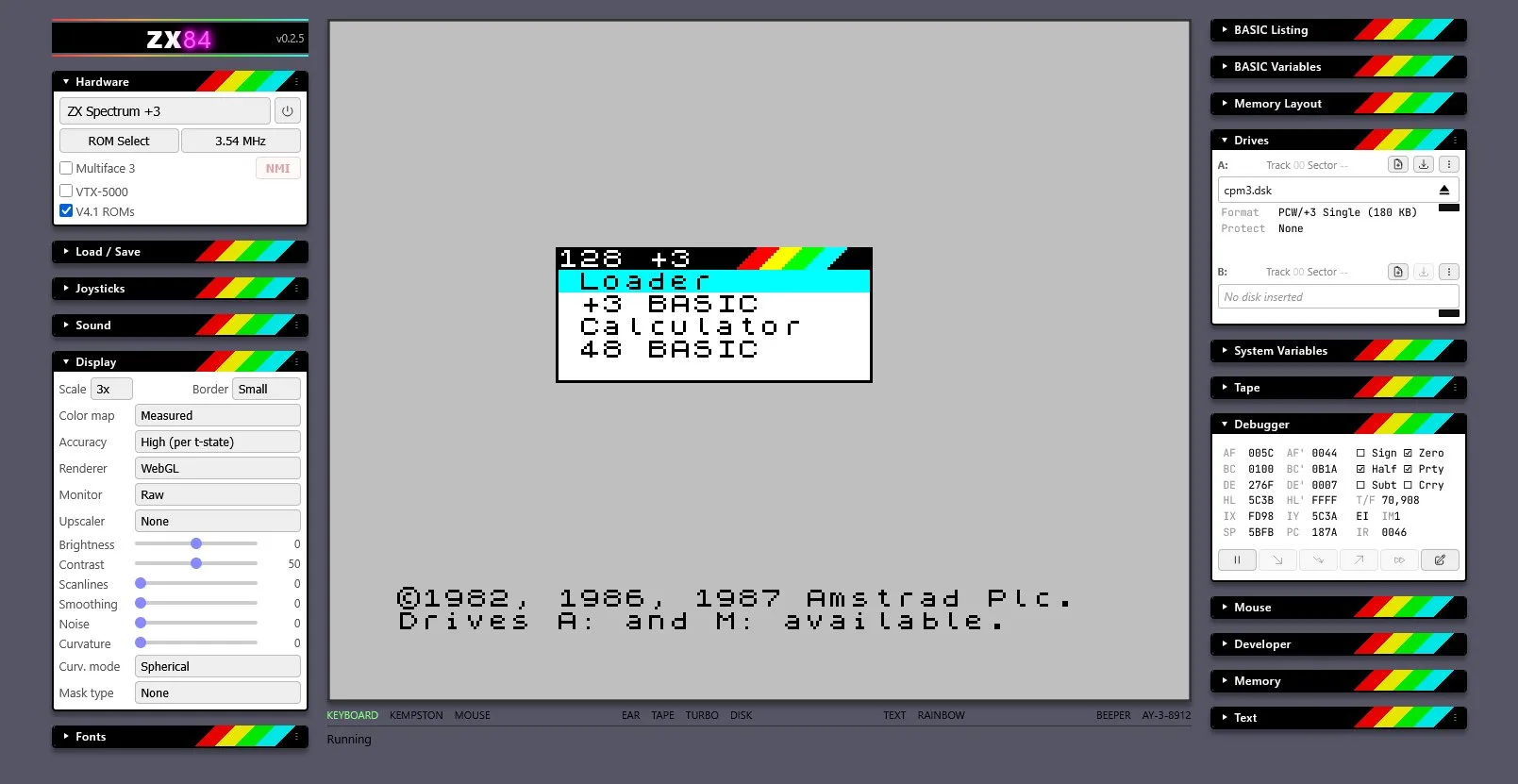
Every panel you see here has a corresponding MCP tool. The debugger, the drives, the display — Claude controls all of it.
MCP: real world example
ZX Spectrum emulator: zx84 MCP
Execution
run         N frames
step        N instructions
continue    until breakpoint
step_frame  one frame exactly
Debugging
breakpoint      set/list
port_watchpoint I/O traps
disassemble     Z80 mnemonics
registers       full CPU state
trace           full/portio/zxtl
Memory & I/O
memory    hex dump
peek poke read/write bytes
find      byte sequence search
port_in   read I/O port
port_out  write I/O port
Input
key   press key for N frames
type  type a string
      handles symbols, shift
      combos, enter, etc.
Loading
load   TAP TZX SNA Z80 SZX DSK
save   SZX snapshots
model  switch 48k/128k/+3
eject  tape or disk
The magic one
ocr  read the screen
     Claude can "see" what
     the Spectrum is showing
     → debug tool → feature
30+ tools in ~700 lines of TypeScript. Claude gets full control of a running Spectrum.
Measuring success
How does Claude know if it worked?
Measuring success
Know when to be in the loop
Subjective → stay in the loop
A look. A feel. A vibe. Claude can't judge these — but you can make it efficient. Expose the knobs, tweak sliders not prompts.
Up next: Spectrum Analyzer →
Measurable → get out of the way
Give Claude the tools to measure the result itself. Does the output match the reference? Do the tests pass? This is how these models were trained — attempt, measure, improve. Extend that loop into your domain.
Up next: Sound Chip Emulation →
Human in the loop
Spectrum Analyzer: expose the knobs
Claude gets the math right
FFT, frequency binning, stereo separation — all correct first time
But it looks wrong
Claude can't judge aesthetics. "Make it look better" is a dead-end prompt
Expose the internals as controls
Glow, HF Boost, Input Gain, band count, colour schemes — all tuneable by a human
Debug tool → product feature
The controls shipped to users. They love tweaking them too
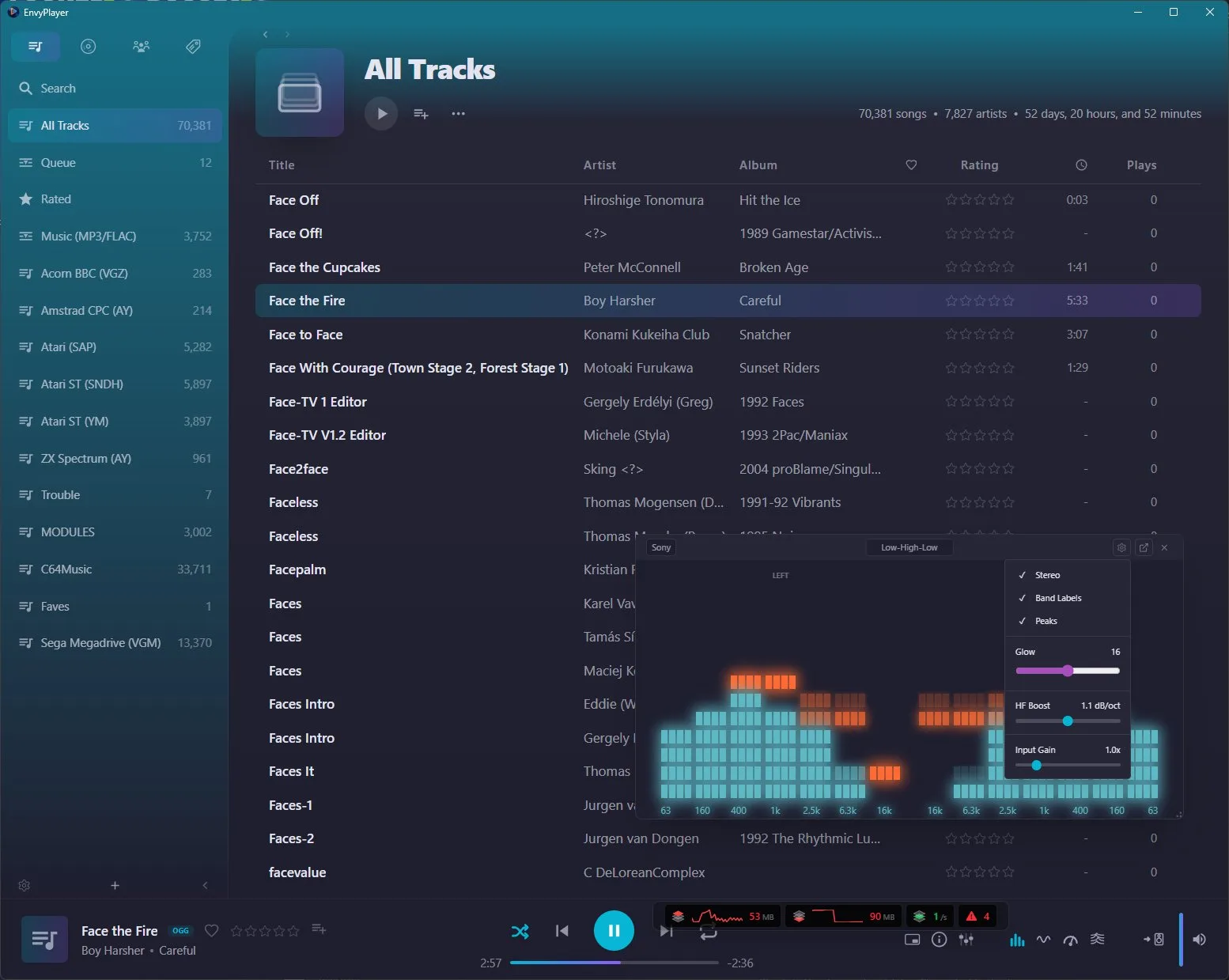
Get out of the way
Sound Chip Emulation: close the loop
CPUs are easy
Spec test suites exist — binary pass/fail. Claude iterates quickly
Sound chips are hard
No test suite. How does Claude know if it sounds right?
Add an MCP for remote control
Claude can load songs, trigger playback, control the emulator
Record to WAV + compare
Claude analyses WAV output against reference material. Now it can measure the delta
// The iteration loop:

1. Load reference song via MCP
2. Emulate → record to WAV
3. Analyse WAV (frequency content,
   envelope shapes, timing)
4. Compare against reference WAV
5. Identify delta → adjust emulation
6. Repeat

// Without the MCP + WAV recording,
// this loop doesn't exist.
// Claude is flying blind.
Key insight: CPUs have test suites. Sound doesn't. So you build the test suite by giving Claude the tools to measure.
Risk
Can I trust AI development?
Risk
Lost access
What happens when the AI isn't available?
Threats
- Pricing changes — costs double overnight, your budget doesn't
- Downtime — critical deploy, AI is down, you're blocked
- Policy violations — account flagged or suspended without warning
- Vendor decisions — features removed, models deprecated, terms changed
Mitigations
- Know more than one tool — Claude Code, Kimi, OpenCode. Don't be single-vendor
- Regular clean-up sessions — refactor AI-generated code to be human-maintainable
- Commit often — you can always roll back to a working state
Risk
Code quality
The daily risks of AI-assisted development.
Over-reliance
You stop understanding your own codebase. Claude wrote it, you approved it, but you can't explain it.
Fix: Always review. Use plan mode. If you can't explain it, don't ship it.
Hallucinated confidence
Plausible code that's subtly wrong. APIs that don't exist. Most likely when information is obscure or there simply is no way to do what you've asked.
Fix: Tests, type checking, manual review. This is why deterministic tools matter.
Context drift
Long sessions where Claude builds on its own earlier mistakes. Compounds silently.
Fix: /compact regularly. Fresh sessions for fresh tasks. Commit before big changes.
Risk
Security & legal
The risks that keep lawyers and security teams up at night.
Prompt injection
Malicious instructions hidden in code comments, docs, or dependencies that hijack Claude's behaviour.
- Review diffs before approving
- Don't auto-approve untrusted repos
- Sandbox when experimenting with unfamiliar code
IP & licensing
Claude may generate code resembling copyrighted or GPL-licensed work. You're legally responsible for what ships.
- Run license scanners on generated code
- Be cautious with very specific implementations
- AI-generated code can only be copyrighted with significant human contribution
Token or key exposure
Claude may embed API keys, secrets, and tokens directly into code that ends up in your repository or shipped to the client side.
- Use .env files and keep them in .gitignore
- Never hardcode secrets — review diffs carefully
- Build in key rotation from day 1 — it's too late once you're exposed
Wrapping up
Next steps
Start a fun side project
Low stakes, high learning. Pick something you've always wanted to build. Let Claude help you figure out the stack and get it running.
Write your first skill
Pick your most painful repeated workflow. Write a SKILL.md. Use it tomorrow. Zero setup, instant payoff.
Take the free course
anthropic.skilljar.com/claude-code-in-action — Anthropic's official hands-on course. Covers everything from basics to advanced workflows.
Run /powerup
Interactive lessons right inside Claude Code. Animated demos teach context management, permissions, hooks, MCP and more — without leaving the terminal.
Wrapping up
Thank you
I'll be around after the talk if you'd like to chat, ask questions, or see a demo.
Overtime
Alternatives
Skills & MCP servers are portable across most of these.
CLI tools
Claude Code
Anthropic. 1M context. Deepest IDE integration. Auto mode.
Kimi Code
Moonshot AI. Open source. 100 parallel agents. 5–6x cheaper.
OpenCode
Fully open source. Provider-agnostic. Any model, no lock-in.
Gemini CLI
Google. Massive context. Free tier. Strong on search.
Codex CLI
OpenAI. GPT-powered. Sandboxed execution.
IDE integration
Cursor
Fork of VS Code. AI-native editor. Inline edits, chat, composer.
Windsurf
Codeium. AI-first IDE. Cascade flow for multi-file edits.
Junie
JetBrains. Built into IntelliJ, WebStorm, PyCharm. Native experience.
Copilot
GitHub/OpenAI. Autocomplete + chat. VS Code, JetBrains, Neovim.
CLI → IDE
Most CLI tools now have official plugins for VS Code & JetBrains.
Models
Claude
Opus (deep reasoning), Sonnet (balanced), Haiku (fast & cheap). Anthropic.
Kimi K2.6
1T params MoE. Open weights. Agent Swarm. Moonshot AI.
GLM-5.1
Zhipu AI. Open source. Strong on code. Z.AI platform.
Gemini
Google. Huge context window. Native multi-modal.
GPT-5.5
OpenAI. Strong all-rounder. Large ecosystem.
Overtime
Context window & token drift
Everything Claude reads and writes consumes tokens from a finite window. CLAUDE.md costs context on every session.
The window
200K tokens default context. 1M tokens with extended thinking (Max plans). Files, commands, responses — it all counts.
Drift
As the window fills, Claude forgets earlier context. Signs: re-reading files, forgetting decisions, contradicting earlier work.
Managing it
/compact summarize & compress
/clear   wipe & start fresh
Long session? /compact regularly. New task? /clear.
Overtime
Agentic search
Claude Code doesn't have a pre-built index of your codebase. It searches actively — like a developer exploring unfamiliar code.
Strengths
No setup required. Works on any codebase immediately. Claude chooses the right tool for each search — regex for patterns, glob for file discovery, full reads for understanding.
Tradeoff
Every search consumes context tokens. Large codebases can eat through the window fast. This is why /compact and CLAUDE.md matter — they reduce how much searching Claude needs to do.
Emerging
Local RAG-based code servers and indexing tools let Claude query your codebase without reading entire files into context. Faster, cheaper — but still community-driven, nothing official yet.
Overtime
Claude optimized itself
During the sound chip work, Claude was recording songs by playing them in real-time to a WAV file. A 3-minute song took 3 minutes to test.
Without being asked, Claude wrote a new MCP tool that rendered the song directly to WAV in milliseconds — bypassing the audio output entirely.
It made its own iteration loop faster. Nobody asked for this.
// Before (real-time):
play_song("commando.sid")
record_to_wav()
// ⏱ 3 minutes...
stop_recording()

// After (Claude's addition):
render_to_wav("commando.sid", {
  duration_ms: 180000,
  sample_rate: 44100
})
// ⏱ ~200ms
Overtime
What is swarm mode?
Instead of one agent working sequentially, multiple agents work in parallel on the same problem.
How it works
- Orchestrator agent breaks the task into parallel workstreams
- Sub-agents work independently — tests, implementation, review
- Results are collected and reconciled
- Claude Code already supports this in skills via
Agenttool - Kimi Code takes it to 100 parallel agents
When to use it
- Large test suites — run all versions in parallel (you've already seen this)
- Multi-file refactors — different agents per module
- Research tasks — parallel investigation of different approaches
- Tasks need to be parallelisable — not every problem splits cleanly
Overtime
The Ralph Wiggum Loop
When Claude gets stuck in a cycle of failed attempts — each one confidently wrong.
Signs you're in one
- Claude tries the same fix with slightly different wording
- It starts making unrelated changes to "rule things out"
- It hallucinates success — "that should fix it" without verifying
- It apologises and tries again with no new strategy
- The codebase is getting worse with each attempt
How to break out
- /clear and reframe the problem completely from scratch
- Switch to plan mode — make Claude describe the problem before touching anything
- Ask Claude to explain what it thinks is happening — often surfaces the wrong assumption
- Git checkout back to a known good state and start fresh
- Extended thinking is useful here — it reasons before acting
Overtime
Practical tips
Skills & tools
- Give exact commands.
dotnet test $SLN -c "Debug EF8"not "run the tests" - Structure in phases. Pre-flight → Execute → Report. Claude handles sequences well
- Show the output you want. Include example tables and error formats — Claude will match them
- Lock down allowed-tools.
Bash(dotnet *)notBash(*)— least privilege - Use sub-agents for parallelism. Default to Haiku for cost. Let users opt up
Closing the loop
- First question: how would Claude know this worked?
- Build measurement early. WAV compare, screenshot OCR, test suites, diff tools
- Subjective? Expose controls. Measurable? Give Claude the instrument
- Let Claude extend its own MCP. It may find optimizations you missed
- Ship the debug tools. If Claude needs it to work, users probably want it too
Overtime
Future talks
Topics I'm exploring. Let me know what interests you.
AI coding tools compared
Claude Code vs Gemini CLI vs OpenCode vs Codex vs Cursor. Models compared: Claude, GPT, Gemini, Z.AI. What's best for what.
Adding AI to your product
Case study: Intracia CMS and its AI-powered JSON schema agent. How to go from "we should add AI" to shipping a real feature.
Vector databases & RAG
Embeddings, semantic search, retrieval-augmented generation. Making AI work with your data without fine-tuning.
AI for non-developers
Claude Desktop, automation workflows, document analysis. What AI can do for people who don't write code.
Security & trust
Prompt injection, supply chain risks, sandboxing, data privacy. The stuff you need to think about before going to production.
Your suggestion?
What would be most useful to you? Come talk to me afterwards.